
Ask questions about your notes in Memory Notes
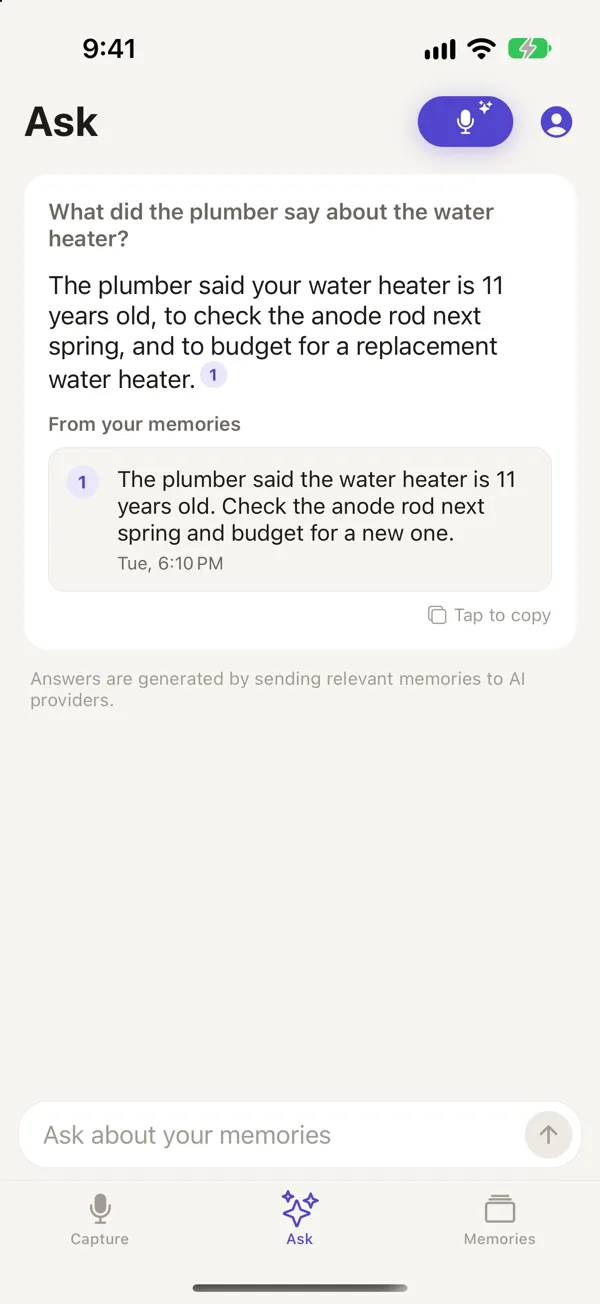
A note can be hard to find months later, especially if you forget how you phrased it. In Memory Notes, you can ask a question instead of searching for keywords. The app answers from your notes and shows you which ones it used.
Updated October 29, 2026
How to ask a question
- If you aren't signed in, go to Account, enter your email, and type the code we send you. Ask answers from the notes synced to your account.
- Go to the Ask tab.
- Enter your question, or tap the microphone to say it.
- Read the answer and tap any linked fact to open the note it came from.
Questions you can ask
Where did I leave my car at the airport?
What did the vet tell me about Biscuit's diet?
What wine did we like at Sara's birthday dinner?
What did I say I'd send Jordan?
Ask looks for meaning rather than exact words. For example, a note saying "the red Toyota is in P3" could answer "where's the car?" If two notes disagree, Ask usually favors the newer one, since you may have updated the information.
How Ask finds an answer
Your question is sent to our server, where an AI relevance model reads your notes and selects the ones related to it. Only those notes are sent to the answering model. It writes a short answer and cites the notes it used. If there are no related notes, Ask tells you rather than making up an answer.
Search limits
Each question uses one search. Regular includes 150 searches per month, and Heavy includes 300. These are shared with any AI assistants you connect and reset on the 1st of each month. The free trial includes 20 searches.
Questions
Why can't Ask find something I recorded?
Make sure the note is in Memories and has synced. You'll need to be signed in and online. If the transcript got a key word wrong, edit the note and try your question again.
Is my question private?
To answer your question, we send it and the text of related notes to our AI providers. You can find more details in the privacy policy. We don't train AI models on your notes.
Can other AI tools ask questions about my notes?
Yes. Claude, ChatGPT, or your own AI agent can search and ask your notes when connected over MCP. See how to connect Claude to your notes.
Memory Notes for iPhone and iPad
Record a note by voice in a second or two, then find it by asking a question. Memory Notes answers from your notes and shows you the one it used. For iPhone and iPad.